Work Less, Grow More: Why Participant Self Edits Are a Game Changer
What are Participant Self Edits? Contents
- What are Participant Self Edits?
- Time Savings that Count
- Self Edit Feature Breakdown & Benefits
- 1. Resend Confirmation
- 2. Print Confirmation
- 3. Refer Friends through a Referral Program
- 4. Edit Registration Question Answers
- 5. Transfer Categories or Athletes
- 6. Defer Registration
- 7. Set Deadlines for Edits
- 8. Turn Changes Into Revenue Opportunities
- The Bigger Impact: Time, Focus, and Growth
- Better Experience for Race Participants
- Why Using Self Edits Matters
By Raquel Oaks
- Participants need to defer.
- Request to change categories
- Emails about missing confirmation emails.
Anyone that has ever managed a race knows the truth. Customer support can take over your entire day.
Countless last-minute edits come up the week before race day- when you are often busiest. It never seems to stop.
Of course, you want to take care of every one of your participants and wish you could spend time with each one of them. It just isn’t possible when you’re trying to provide the highest quality race day experience.
That’s exactly why we built an online registration management portal for participant self edits.
What are Participant Self Edits?
Participant Self Edits allows registrants to manage their own information and make changes without needing to bother you.
Through a simple interface, you can allow participants to…
Have these default settings:
- Resend their confirmation email
- Print their registration confirmation
Also, add these custom preferences:
- Refer friends through a referral program
- Edit their registration details
- Change race categories
- Defer their registration to a future event
All without the assistance of your busy team.
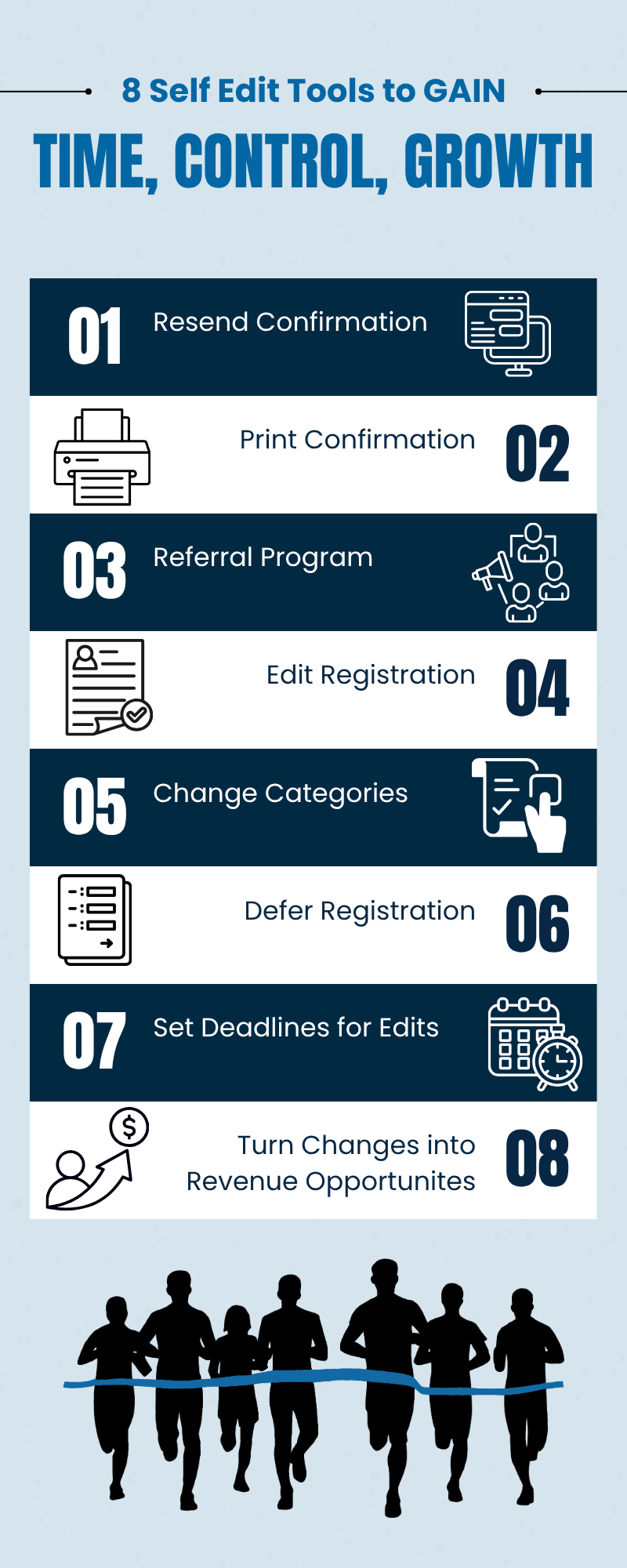
Time Savings that Count
You do all that you possibly can to help your participants, without realizing how much time is being spent on small requests, and that time spent on small requests can quickly add up.
Even if each email only requires a few minutes. When you have thousands of participants that adds up to hours, sometimes days of administrative work. You’re losing time to tasks that don’t actually grow your event.
Worse, these requests often come at the most inconvenient times:
- Right after registration opens
- During price tier changes
- The week leading up to race day
Right when you need to focus most on sponsor deals, permits, marketing, and race day prep a flood of small requests come into your inbox.
Participant Self Edits removes this bottleneck entirely, so you can focus on growth.
Self Edit Feature Breakdown & Benefits
Let’s walk through what your participants can do from their registration management portal and why it actually matters for you as an organizer.
- Resend Confirmation
- Print Confirmation
- Referral Program
- Edit Registration
- Transfer Categories or Athletes
- Defer Registration
- Set Deadlines for Edits
- Turn Changes into Revenue Opportunities
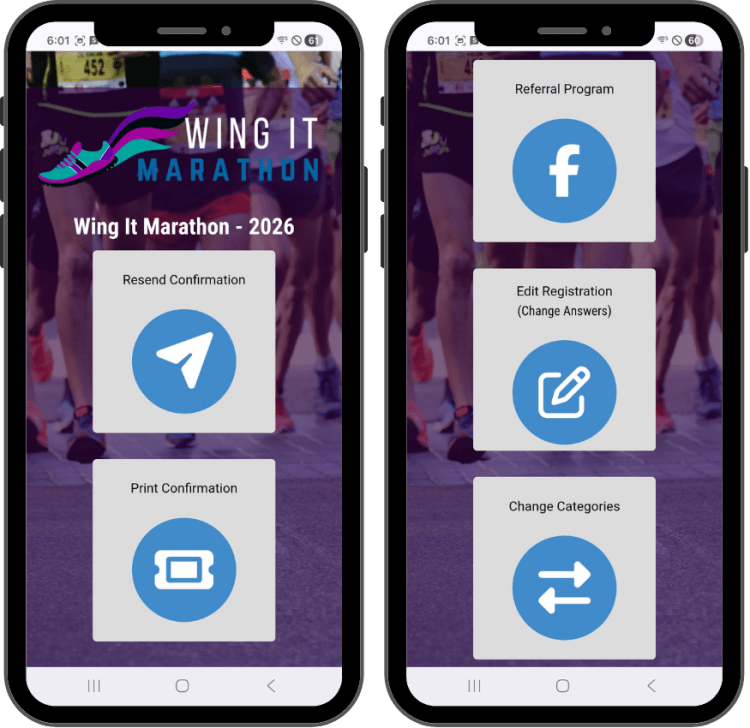
1. Resend Confirmation
Participants often lose their confirmation email. From their personal online registration management portal, participants can resend it themselves.
Alternatively, they can also visit the Find My Order page to search for their registration and resend their confirmation email.
Without the self-help option, this turns into back-and-forth emails between you and the participant trying to discover if the email is being:
- Sent to a spam folder
- Email was entered wrong
- Accidental email deletion.
With Race Entry's tools: They can figure out the problem on their own and resend it instantly.
2. Print Confirmation
The quick ability to print their own registration confirmation on their own helps simplify your job. Participants can print directly from their confirmation email or from their online registration management portal.
With one click on the Manage my Registration page on our website.
Participants enjoy:
- easy to print registration
- mobile option to have available at participant check-in that is available with a convenient QR code.
3. Refer Friends through a Referral Program
This is a growth tool without more work for you. Once you set up your referral rewards program, you don't have to do anything else — your participants can manage their own redemption.
The referral program is also an easy growth tool participants can benefit in and also help your race grow.
Participants can:
- Share their unique referral link.
- Get friends signed up.
- Track progress towards a full refund on their registration fee.
- Accept their referral refund when ready.
Learn more about Race Entry's growth tools.
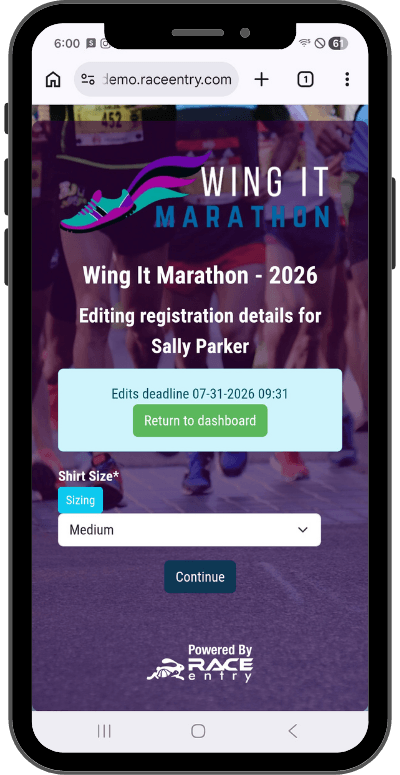
4. Edit Registration Question Answers
Allow participants to make approved edits. We are human, and we all make mistakes:
- Misspelled Name
- Incorrect information
- Wrong Shirt Size
Instead of emailing you, let participants fix it themselves.
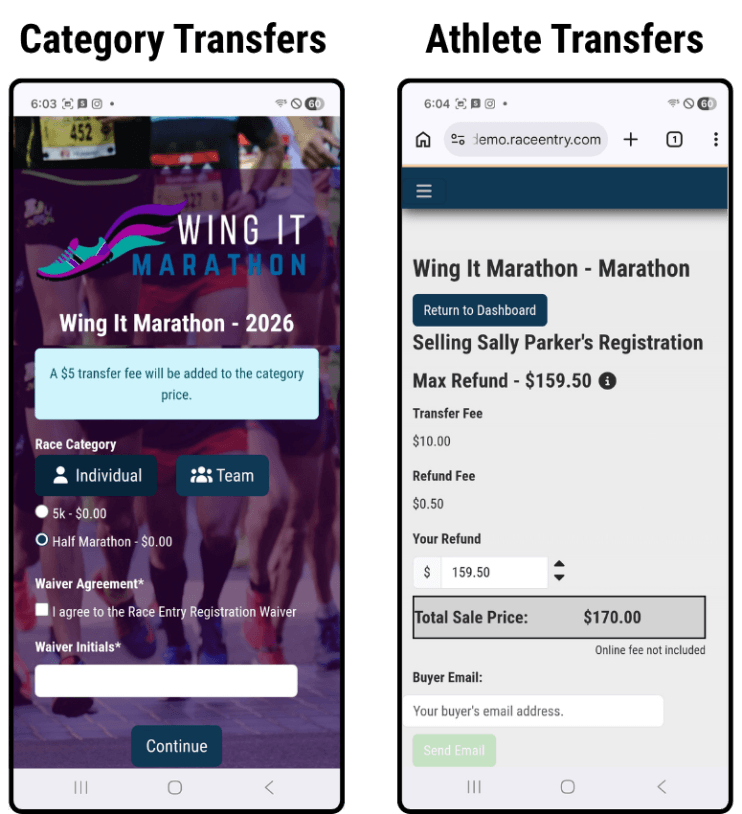
5. Transfer Categories or Athletes
This self edit feature is huge for races.
Participants often want to:
- Switch from 10K to 5K
- Upgrade to a longer distance
- Adjust based on training progress
- Gift or sell their registration to a friend
Determine what kinds of transfers you'll allow, then participants can handle all of these decisions on their own. Saving you significant time while improving participant flexibility and satisfaction.
6. Defer Registration
Life happens — injuries, schedule and circumstance changes, unexpected events.
These requests can often be the most time consuming, they are:
- hard to track
- prone to errors.
With self edits: Deferrals can be handled efficiently and cleanly.
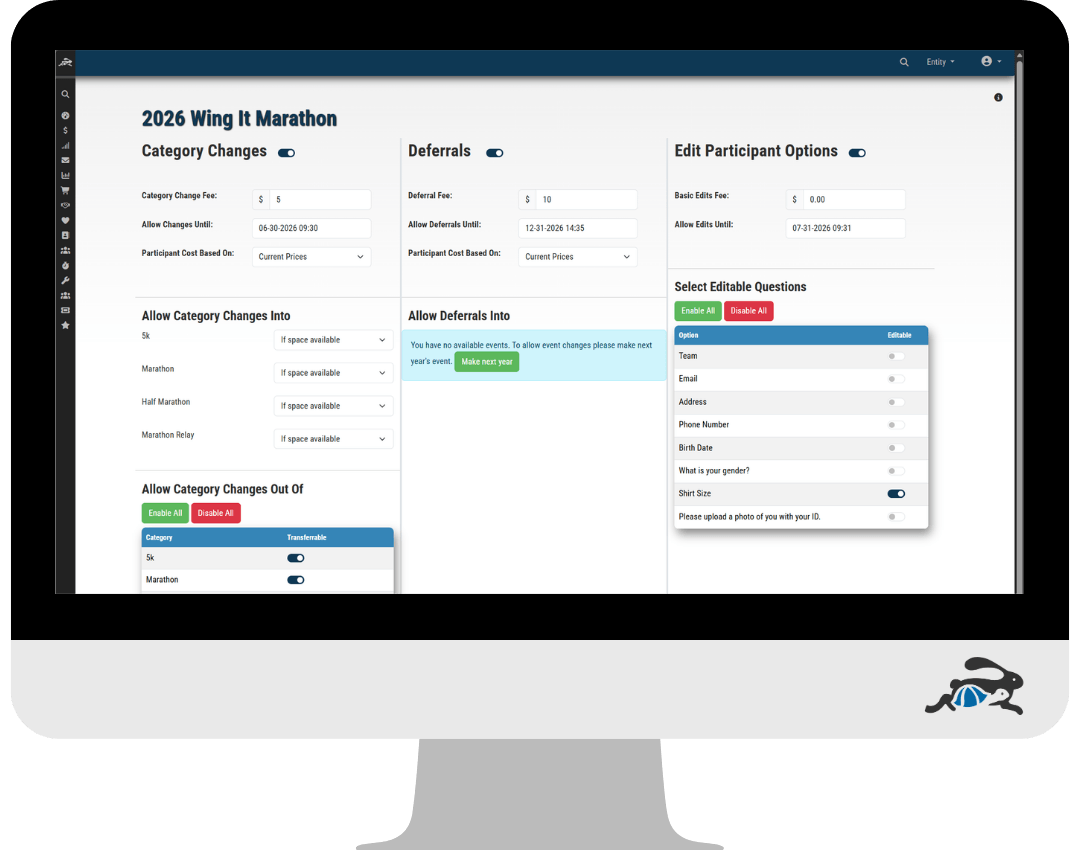
7. Set Deadlines for Edits
One of the biggest challenges with participant changes isn’t just handling them- it’s knowing when to stop allowing them.
As race day approaches, your data needs to be finalized. Timing companies rely on clean, accurate participant information to ensure:
- Correct race results
- Accurate age group placements
- Smooth award distribution
Last minute changes can create confusion, delays, and even errors in official results.
You can stay in control of your event logistics by setting your own deadlines while still offering flexibility early on.
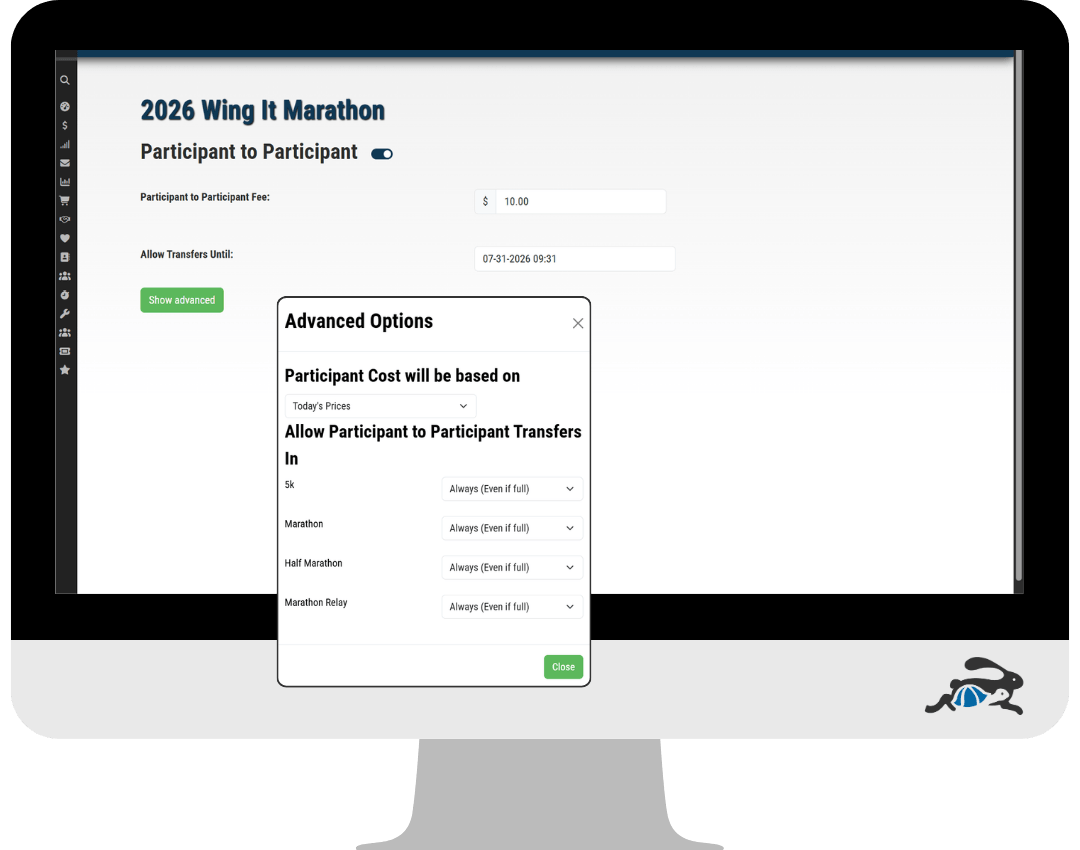
8. Turn Changes Into Revenue Opportunities
Most organizers view participant changes as a cost — something that takes time money and resources.
What if those changes could actually generate revenue?
Instead of absorbing the cost of administrative work, you create a system where:
- Participants get flexibility
- Your event captures additional revenue
You can do this by setting fees for changes and setting your own rate.
The Bigger Impact: Time, Focus, and Growth
The real value of Participant Self Edits isn’t just convenience — it’s freedom.
When you remove repetitive customer service tasks, you gain back time to:
- Focus on marketing your race
- Build partnerships and sponsorships
- Improve the participant experience
- Analyze growth and performance
Instead of reacting to emails all day, you can start working on your event — not just in it.
Better Experience for Race Participants
It’s not just about saving organizers time.
Participants benefit too:
- Instant access to their information
- No waiting for email responses
- More control over their registration
- A smoother, more professional experience
In today’s world, people expect self-service options. This feature meets that expectation.
Why Using Self Edits Matters
Races are becoming more competitive.
Participants have more choices, and their expectations are higher.
Races grow with organizers who:
- Operate efficiently
- Provide a seamless experience
- Reduce friction
Participant Self Edits helps you do all three.
Customer service will always be part of running an event — but it doesn’t have to consume your time.
By giving participants the tools to manage their own registrations, you:
- Reduce your workload
- Improve accuracy
- Enhance the participant experience
- Create more space to focus on growth
Sometimes the biggest improvements don’t come from doing more — they come from letting the right systems do the work for you.